Start with the assignment you have in mind. What material will the model need, where might it make mistakes, and how much work will you have to do to check the result?
Research checked Six model families · Sources throughout
Six models. Different ways of thinking.Imagined personalities · AI-generated illustration
FIRST, A LITTLE CLARITY
The model is only part of the experience.
“Frontier” describes models near the leading edge of broad AI capability. It is not a certification of accuracy, confidentiality, or suitability for legal work.
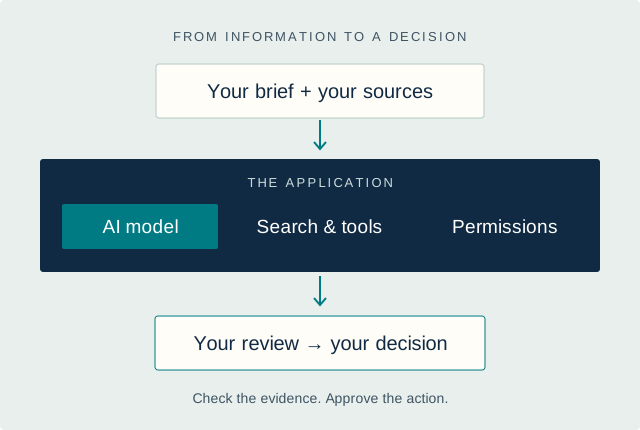
A model generates and reasons over information. The application around it supplies files, search, permissions, and the interface you use. A good result depends on both, as well as your review of the answer.
A practical workflow: brief → tools and model → review → decision.
CLIENT CONFIDENTIALITY · CLOUD VS. LOCAL
Where does your client’s information go?
Before you ask what an AI can do, ask where it does the work. For a lawyer, that distinction can matter as much as the answer.
“When you type text into ChatGPT or a similar model, where is that data going? Who might see it?”
You enter a question or upload a document. The service sends that material over the internet to computers operated by a provider, runs the model, and sends an answer back.
This gives you access to powerful models without buying specialized hardware. But the provider processes the information you send. Its terms and your specific plan determine what it may keep, who may access it, and whether it can use it for training.
FULLY LOCAL
The work happens on equipment you control.
Your file→Local model→AnswerAll inside your device
You download a model and run it on your computer or on a server inside your firm. With the entire workflow configured locally, the documents, questions, and answers stay there.
Think of working in a document saved on your laptop. The software is doing the work where the file lives. Once the software and model are installed, supported local workflows can operate without an internet connection.
With a cloud service, the portions you submit travel to that service for analysis. With a fully local setup, the transcript is read and summarized on your own equipment. Your summary can remain in the same protected environment as the original file.
LM Studio documents offline chat and local document processing. Ollama documents a local-only mode that disables its cloud models and web search. These are examples of local software, not blanket approvals of every configuration or add-on.
The application may save conversations, uploaded copies, document search indexes, or logs. Backups may preserve them too. Those records need the same care as the client file itself, including access restrictions and an appropriate retention policy.
The advantage is control: the firm can decide where those records live and how they are protected. Deleting a chat is not proof that every copy has been removed. Check the application’s storage and backup behavior.
PUT THE PROTECTION INTO PRACTICE
Keep the whole workflow private.
Confirm that the model really runs locally. An app installed on your computer can still call a cloud model. Have your IT professional verify the selected model and where requests go; an offline test with fictional material is a useful first check.
Check every step that handles the file. Scanned-document reading, document search, web searches, plugins, and connected services can send information elsewhere even when the model is local. Disable unapproved connections, content telemetry, and automatic cloud sync.
Protect the computer and its copies. Use disk encryption, restricted accounts, screen locks, current software, and protected backups. Use multifactor authentication where supported. A stolen or compromised device can expose locally stored information.
Keep access limited to the right people. Do not expose the local model server to the public internet. For shared firm systems, have IT configure authentication and matter-level permissions so a document search cannot cross an ethical wall.
“Not used for training” and “not retained” are different promises. OpenAI’s API, for example, does not use customer data for training by default, but separately documents retention of monitoring logs and some application data, with controls and exceptions.
Review the exact service, contract, retention periods, deletion rules, human access, and connected vendors. An approved enterprise arrangement may suit a matter; a consumer account may have different terms.
Local processing trades provider dependence for responsibility over your own equipment. Hardware, setup, and maintenance take resources. A model that fits on a laptop may be slower or less capable on a particular task; not every frontier model is available to download.
Local hosting does not itself guarantee privilege or satisfy every professional duty. Assess the client, matter, tool, and applicable rules; obtain informed consent when required. Whatever the hosting choice, verify the model’s work before relying on it.
The material a model can work with in one request. It is measured in tokens, small units used to represent text and other inputs. A bigger window does not guarantee better recall.
Reasoning effort
A setting that lets supported models spend more processing on a problem. More effort can increase time and cost; it does not certify the answer.
API pricing
Usage charges for software calling a model. Input is what you send; output is what it generates. These are separate from a monthly chat subscription and may include additional tool charges.
START WITH YOUR WORK
What do you want to do?
Choose a task for a suggested comparison and a trial you can run on your own material.
Start with the source documents.
Compare Claude Opus 5 and GPT on the same fictional agreement or business memo. Escalate to Fable or Astra for more demanding work. Judge factual support, omitted qualifications, and revision time. A polished answer can still leave important work undone.
A useful testAsk both models to separate direct evidence, inference, and missing information.
Use public, fictional, or properly approved material. Define what a good answer must contain before you read either result.
01
Hold the brief constant.
Use the same facts, instructions, format, and tools. Record the exact model, date, and reasoning setting.
02
Check support and omissions.
Verify claims, citations, calculations, and missing qualifications. Include a question the supplied facts cannot answer.
03
Measure the work left.
Track correction time, cost, speed, and consistency over several examples. Choose the result you can trust after review.
A STARTER BRIEF TO ADAPT
Using only the supplied material, prepare a one-page briefing. Separate supported facts, reasonable inferences, and unanswered questions. Cite the passage or page behind each important claim. Do not fill gaps with invented facts. End with the checks a human should make before relying on the result.
This improves the brief; it does not guarantee compliance or correctness.
HOW TO READ THIS GUIDE
What this guide can tell you
What we researched
Official model documentation, release notes, model cards, pricing, and data terms. This edition covers six selected general-purpose model families relevant to professional work. It is not an exhaustive catalog or a claim that every model is at the same capability level.
Specialist legal products, image generators, and other families deserve their own evaluations. A provider’s advertised capability is identified as such; the suggested trials and shortlists are our editorial interpretation.
What we did not test
We have not run a controlled head-to-head evaluation of these releases. This guide does not assign numerical quality scores or declare a universal winner. A large context window measures capacity, not perfect recall.
Benchmark outcomes depend on model version, reasoning settings, tools, task selection, and judging. Artificial Analysis also changes and versions its index. Compare like-for-like results, then test your own work.
For attorneys, check legal authorities in the original source and confirm jurisdiction and current validity. Review the tool’s data handling before entering client information. ABA Formal Opinion 512 addresses competence, confidentiality, communication, supervision, and other duties; your jurisdiction’s rules and court requirements also matter.
For business owners, the same working discipline is useful: verify numbers and claims, protect customer information, and approve commitments before they leave the company. A stronger model is one part of a better process.